

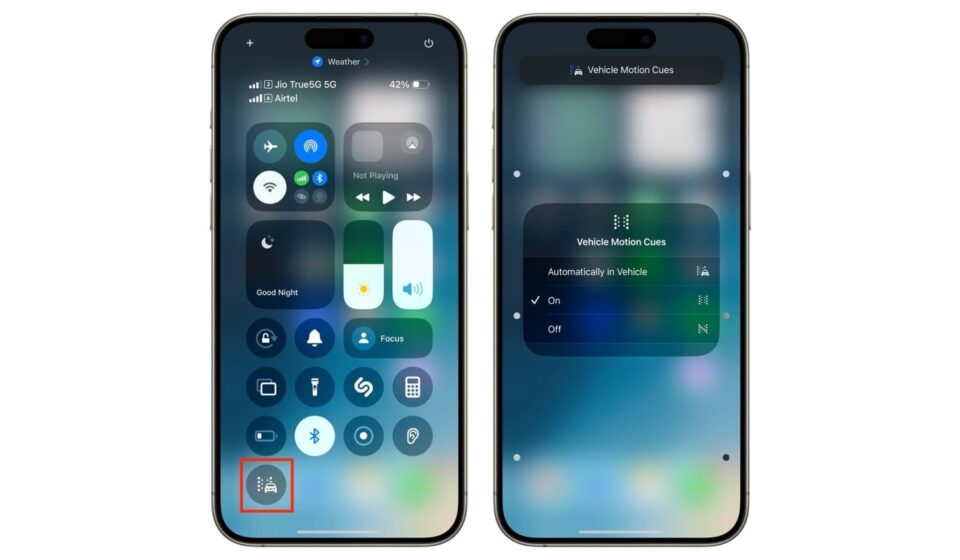

An overlooked iPhone feature is gaining attention among people who experience motion sickness, offering a simple way to reduce nausea while travelling.
Known as Vehicle Motion Cues, the feature displays animated dots along the edges of the screen. The dots move in response to the motion of a vehicle, using the phone’s built-in sensors to provide visual cues that correspond with the user’s movement.
Experts say the feature may help reduce the sensory confusion that can trigger motion sickness.
Motion sickness can occur when the body’s senses receive conflicting information about movement. For example, the inner ear may detect that a vehicle is moving while the eyes remain focused on a relatively stationary phone screen.
Stanford University clinical associate professor Kristen Steenerson says visual information that reflects the body’s movement can help reduce dizziness and disorientation.
Some users have described Apple’s feature as highly effective, while others say they have noticed little or no improvement.
To activate Vehicle Motion Cues, iPhone users can go to Settings > Accessibility > Motion > Vehicle Motion Cues. The feature can be switched on permanently or set to activate automatically when the phone detects that the user is travelling in a vehicle.
Users can also adjust the appearance of the dots, including their size and colour.
Despite its growing popularity, the feature comes with an unusual drawback: it may encourage people to continue looking at their phones while travelling rather than putting the device away.
For people whose motion sickness is triggered by staring at a screen, however, the feature could provide a useful option for making journeys more comfortable.
And for those who still feel sick, there remains one simple solution: put the phone down and enjoy the journey.